


Your sales team is losing track of leads. Follow-ups are slipping through the cracks. Someone is still managing deals in a spreadsheet that hasn’t been updated since last Tuesday.
You already know you need a CRM. The harder question is which one, and whether it’s worth the complexity, cost, and disruption of switching. Zoho CRM keeps coming up in your research, and for good reason: it’s used by over 300,000 businesses worldwide, it’s one of the most feature-rich platforms in its price range, and it starts free. But a feature list doesn’t tell you whether Zoho CRM is the right fit for your business, your team, and your current stage of growth.
In this overview, we’ll walk you through exactly what Zoho CRM does, how it compares to alternatives like Salesforce and HubSpot, who it’s genuinely built for — and where it falls short.
A quick note on perspective: ENWAY is a certified Salesforce implementation partner, and we want to be upfront about that. But that’s also why we can give you an honest assessment of Zoho. We’ve seen both platforms in action and know that the right CRM depends entirely on your business needs. For some companies, Zoho is the right choice. For others, it isn’t. This guide will help you understand which side of that line you’re on.
What Is Zoho CRM?
Zoho CRM is a cloud-based customer relationship management platform built primarily for small and mid-sized businesses. It launched in 2005 — one of the earliest cloud CRMs in the market — and has since grown into a comprehensive sales platform covering lead management, pipeline tracking, workflow automation, multichannel communication, and AI-driven forecasting.
It sits within the broader Zoho ecosystem of 50+ business applications, which means it connects natively to Zoho’s own tools for email marketing (Zoho Campaigns), customer support (Zoho Desk), accounting (Zoho Books), and project management (Zoho Projects). For businesses already using multiple Zoho products, that integration is a genuine advantage. For those outside the Zoho ecosystem, the value depends more on the CRM itself.
Gartner recognized Zoho as a Visionary in the 2025 Magic Quadrant for Sales Force Automation, reflecting both its investment in AI and its continued relevance in the mid-market.
In plain terms: Zoho CRM is a capable and cost-competitive platform best suited for budget-conscious SMBs that need more than a basic pipeline tool but aren’t ready for the cost and customization level of Salesforce.
Key Features of Zoho CRM
Sales Automation
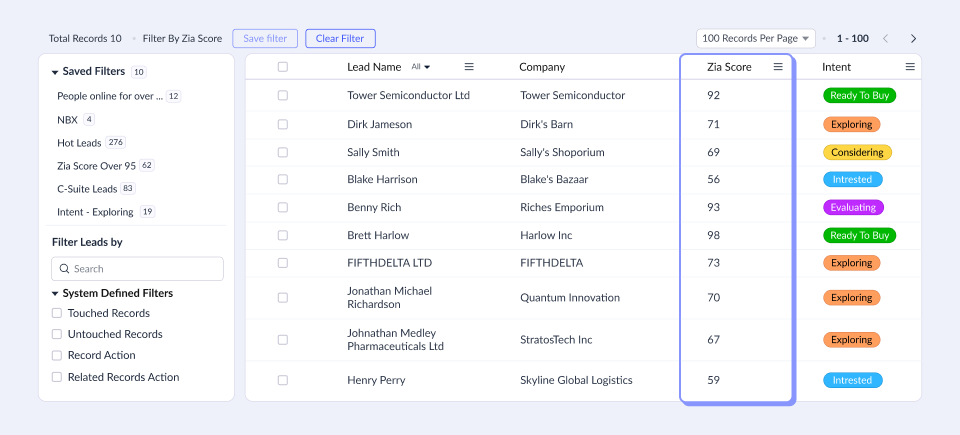
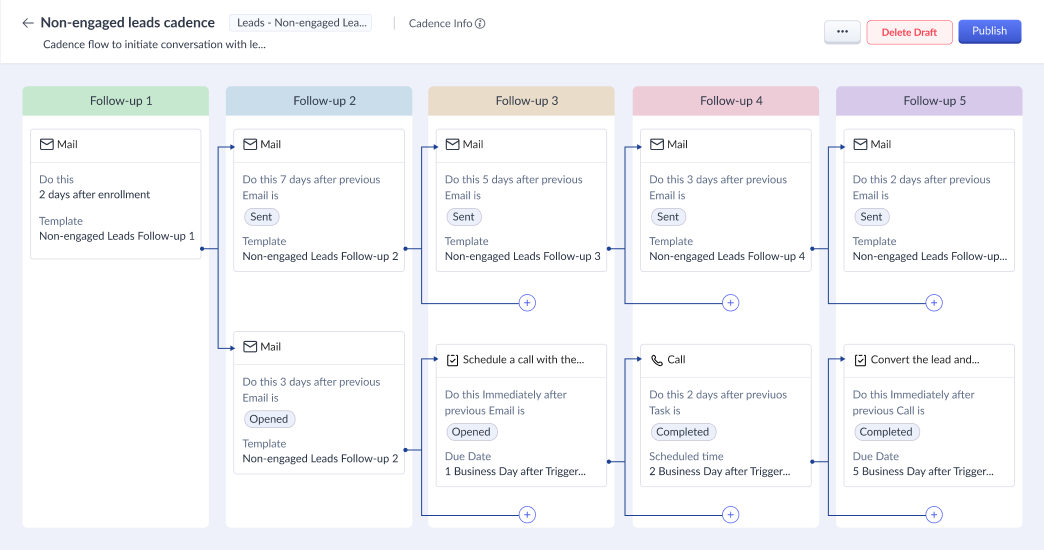
The foundation of Zoho CRM is its sales pipeline management. You can capture leads from multiple sources — web forms, social media, live chat, email campaigns — and route them automatically using round-robin assignment rules or territory logic. Each lead moves through a visual pipeline with customizable deal stages, values, and close probabilities.
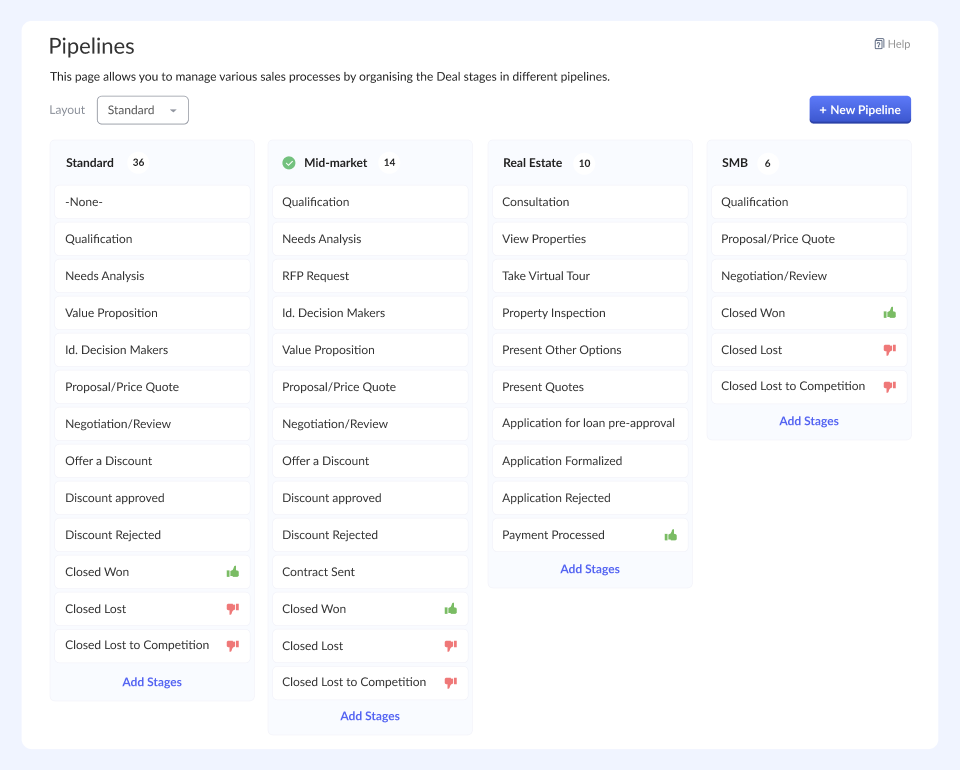
Key automation capabilities include:
- Scheduled automations that act on records based on date conditions (e.g., follow up if no activity in 7 days)
- Workflow rules that trigger actions (send email, create task, update field) based on deal stage, lead score, or time conditions
- Blueprint, which lets you map and enforce your sales process step by step — so reps can’t skip a stage or miss a required action
- Macros for one-click execution of repetitive multi-step actions
Multichannel Communication
Unlike CRMs that rely on a single communication channel, Zoho CRM brings email, phone, live chat, social media, and SMS into one place. The SalesInbox feature prioritizes emails based on CRM context, surfacing messages from active leads and deals at the top. Telephony integration allows calls to be logged automatically against the right record.
Canvas — Custom Interface Builder
One of Zoho CRM’s most distinctive features. Canvas lets you redesign the entire look and layout of your CRM interface. You can rearrange fields, change colors, embed images, and create custom module layouts without writing a single line of code. Most CRMs offer limited customization of what fields you see. Zoho lets you change how the entire interface looks, which matters significantly for user adoption on less technical teams.
Zia — AI Assistant
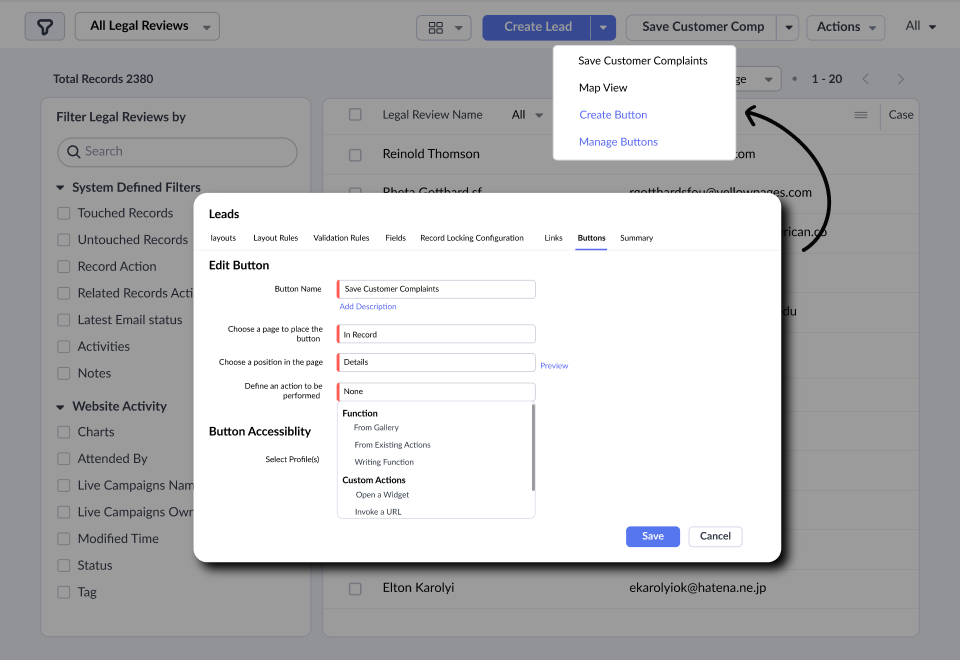
Zia is Zoho’s built-in AI engine, fully available from the Enterprise plan upward. It’s an intelligence layer woven into your deal and lead data. What Zia does in practice:
- Lead and deal scoring: Assigns a 1–100 score to every record based on your historical conversion patterns.
- Win probability prediction: Updates as deal activity flows in, flagging at-risk deals before they go cold.
- Anomaly detection: Alerts you when sales activity deviates from normal patterns — useful for spotting team performance issues early.
- Workflow suggestions: Monitors repetitive activity patterns and proactively recommends automation rules.
- Generative AI: Users can now create content and summaries, as well as CRM modules, workflows, and reports, by describing what they need in plain language while Zia builds the structure automatically.
One practical note: Zia needs data to work well. Most teams see meaningful lead scoring accuracy after 75+ converted leads are in the system.
Reporting and Analytics
Zoho CRM includes 40 pre-built reports and a drag-and-drop custom dashboard builder. You can create KPI trackers, cohort analyses, territory comparisons, and sales forecasts at the rep, team, or regional level. The Ultimate plan includes Zoho Analytics Premium for advanced BI reporting, which is useful for teams that want to pull data across the Zoho suite into unified dashboards.
CRM for Everyone (CRM4E)
A recent addition that expands CRM access beyond just the sales team. CRM4E lets non-sales staff (support agents, finance, and operations) participate in deal workflows without needing a full CRM license. This is useful for businesses where deals require multi-department coordination before closing.
Zoho CRM Pricing — Plans and What You Actually Get
Zoho CRM uses a per-user, per-month pricing model. All prices below are billed annually. Monthly billing adds roughly 20–34% to each rate.
| Plan | Price (per user/month, annual) | Best For |
| Free | $0 (up to 3 users) | Individuals or micro-teams testing the platform |
| Standard | $14 | Small teams needing basic automation, reporting, and Canvas custom layouts |
| Professional | $23 | Growing teams that need Blueprint, CPQ tool, and deeper automation |
| Enterprise | $40 | Businesses needing full Zia AI tools, low-code workflow building, and territory management |
| Ultimate | $52 | Scaling companies needing enhanced feature limits and priority support |
Note: Always verify current pricing on Zoho’s official pricing page, as rates can vary by region and are updated periodically.
What the Free plan is actually good for: Testing Zoho CRM’s interface and confirming it fits your workflow. The Free plan caps usage at 3 users and includes only basic core features and reporting. It’s a trial, not a long-term solution.
Where most growing teams land: The Professional plan at ~$23/user/month is Zoho’s most popular tier for good reason. It includes Blueprint (process management), expanded automation, and 10GB of storage — enough for most teams of 5–25 people.
When to consider Enterprise or Ultimate: If you need Zia AI features, advanced product customization, territory management, or up to 20-50 extensions for Zoho CRM, you’re looking at $40–$52/user/month.
Zoho CRM vs. The Alternatives
Zoho CRM vs. Salesforce
Best for: Budget-conscious teams vs. teams seeking near-unlimited customizability
Salesforce is the global CRM market leader with roughly 23% market share and an ecosystem that no platform can fully match. AppExchange alone offers thousands of integrations. But even on lower tiers, it still comes at a cost that many SMBs can’t justify, and setup complexity typically requires dedicated admin resources or external implementation support. On the other hand, Zoho CRM gives you approximately 80% of Salesforce’s SMB functionality at around 40% of the price.
Choose Salesforce if: You’re planning to scale long term, don’t want to outgrow your CRM, and need a platform that can adapt to highly customized business processes through advanced configuration and custom development.
Choose Zoho if: You need a fully functional, feature-rich CRM for 5–30 users and want to keep costs manageable while you grow.
One more thing worth knowing: if you implement Zoho well and eventually outgrow it, migrating to Salesforce is a well-established path — and one ENWAY has guided clients through multiple times. However, starting with the right CRM architecture from day one makes that transition significantly smoother when the time comes.
Increase sales productivity by 29% using CRM
ENWAY is a 5-star Salesforce implementation partner, completing projects in Europe, the US, the UK, and the Emirates. We help you choose the right Salesforce edition and get started with CRM.
Zoho CRM vs. HubSpot
Best for: Flexibility vs. ease of use
HubSpot’s CRM is widely regarded as the most polished and beginner-friendly option in the market. Most teams achieve meaningful adoption within 30 days, and the free tier is genuinely useful (unlike Zoho’s, which is more of a demo). HubSpot’s strength is inbound — its marketing tools are deeply integrated and best-in-class for content-led growth strategies.
Zoho’s advantage is cost and customization depth. HubSpot’s pricing climbs quickly as you add contacts, users, and hubs. A growing team using HubSpot Marketing, Sales, and Service Hubs together can easily spend 3–4x what they’d pay for Zoho One, which bundles CRM, marketing, support, and 40+ other apps into a single subscription.
Choose HubSpot if: Marketing and sales alignment is your priority, and your team needs a platform they can adopt quickly with minimal training.
Choose Zoho if: You want more control over customization, need the CRM + support + finance stack under one bill, and are comfortable spending time on proper configuration.
Zoho CRM vs. Pipedrive
Best for: Full-feature suite vs. simplicity
Pipedrive is built for one thing: helping sales reps close deals. Its pipeline view is the cleanest in the market, and adoption is typically fast. It doesn’t try to be a marketing platform, a support system, or an analytics suite.
Zoho CRM is substantially more complex than Pipedrive, which is both its advantage and its limitation. If your team needs multichannel communication, AI-driven forecasting, Blueprint process management, and a custom interface, Zoho delivers all of that. If they just need a visual pipeline that gets out of the way, Pipedrive is the better choice.
Choose Pipedrive if: Your team is purely sales-focused and values simplicity over features.
Choose Zoho if: You’ve outgrown a simple pipeline tool and need automation, process enforcement, and AI forecasting without moving to enterprise pricing.
Who Is Zoho CRM Best For?
Best for:
- Cost-conscious SMBs (5–100 users) that need a comprehensive feature set without enterprise pricing.
- Businesses already using Zoho products (Desk, Books, Campaigns) who want a unified ecosystem.
- B2B and B2C businesses that need multichannel communication, not just email and calls.
- Companies with defined sales processes that want to automate and manage them efficiently.
Less ideal for:
- Teams that need rapid, low-friction adoption — Zoho’s interface has a steeper learning curve than HubSpot or Pipedrive, and the dense feature set can overwhelm non-technical users without proper onboarding.
- Businesses that need deep third-party integrations — Zoho’s integration ecosystem is solid, but not comparable to Salesforce’s AppExchange or API flexibility.
- Sales teams with complex pipelines, approval hierarchies, or a need for full-scale custom CRM development beyond low-code tools.
- Teams that prioritize mobile-first usage — Zoho’s mobile app works, but users consistently report it is less smooth than the desktop version, particularly for quick record updates.
The Zoho CRM Setup Reality
This is where many businesses underestimate the investment. Zoho CRM’s pricing is genuinely competitive, but the platform’s strength comes from configuration — and out of the box, it can look dense and generic. Businesses that install Zoho and try to use it without a proper implementation plan typically see low adoption and ultimately switch platforms.
A properly configured Zoho CRM looks very different from the default setup. Blueprint-enforced pipelines mean reps can’t skip steps. Zia-scored leads mean managers can prioritize without gut feel. Canvas-redesigned layouts mean the interface shows your team exactly what they need, without clutter.
Getting there requires:
- Mapping your actual sales process before touching the platform
- Configuring automation rules that reflect how your team actually works, not how a demo video suggests it should work
- Training that focuses on the workflows your team will use daily — not a tour of every feature
- An ongoing admin resource (even part-time) for updates, new automations, and user management
If you have the internal resources to manage this, Zoho CRM is a great value and worth the investment. If you don’t, working with an experienced implementation partner can dramatically shorten the time to a working, adopted CRM — and prevent the common failure mode of a half-configured platform that nobody uses. That’s true whether you choose Zoho, Salesforce, or any other platform. The software is rarely the problem; implementation is.
Zoho CRM: Honest Pros and Cons
| Pros | Cons |
| Great value for features per dollar | Limited feature quotas (e.g., number of validation rules, layouts, etc.). |
| Canvas for full interface customization | Mobile app less polished than competitors |
| Blueprint enforces sales process compliance | UI can feel cluttered without a proper setup |
| Zia AI included in the Enterprise plan | Zia requires data history to be accurate |
| Native Zoho ecosystem integration | Third-party integrations less extensive than Salesforce |
| Free plan for up to 3 users | Free plan is too limited for real use |
| Privacy-first, no ad-based business model | Support quality can be inconsistent at lower tiers |
Frequently Asked Questions About Zoho CRM
Yes — the Free plan supports up to 3 users indefinitely. However, it excludes advanced workflow automation, mass email, advanced reporting, and most integrations. It’s useful for exploring the interface but not for running a real sales operation. Most teams need the Standard plan ($14/user/month) at a minimum.
Salesforce offers greater depth, a larger integration ecosystem, and near-infinite customization options. For example, you can even build a project management tool inside Salesforce. Zoho CRM offers more features per dollar for SMBs and a native suite of business applications. For teams of 5–50 users, Zoho often delivers comparable day-to-day functionality at 30–50% lower cost.
It depends on your team’s technical comfort level and how much you invest in configuration. Out of the box, Zoho CRM works, but it isn’t optimized for your business. A proper implementation — mapping your sales process, building workflows, configuring fields, and training your team — typically takes 4–12 weeks, depending on complexity.
Yes. Zoho CRM is well-suited for B2B sales with longer deal cycles, multiple stakeholders, and complex pipelines. Its account and contact hierarchy, process management, CPQ, territory management (Enterprise+), and multi-currency support all address common B2B needs.
Zia is Zoho’s AI engine for lead scoring, deal predictions, anomaly detection, and workflow suggestions. It’s available from the Professional plan ($23/user/month), with full functionality in the Enterprise plan ($40/user/month). For teams generating enough data (typically 75+ converted leads), Zia’s predictions become meaningfully accurate and can reduce wasted prospecting time. For very small or early-stage teams, the data volume may not yet justify the Enterprise cost.
Yes. Zoho supports imports from Salesforce, HubSpot, Pipedrive, and most other major platforms via CSV or direct migration tools. The technical migration is usually straightforward. The bigger challenge is re-configuring your workflows, pipelines, and automations to match Zoho’s structure.
Is Zoho CRM the Right Choice for Your Business?
If you’re a growing SMB that needs a capable, fully featured CRM and can’t justify Salesforce’s price point, Zoho CRM is one of the strongest options in the market. The pricing is competitive, the feature set is deep, and the Zoho ecosystem creates real value for businesses that consolidate multiple tools under one subscription.
If you’re evaluating Zoho CRM for your business, the most important first step isn’t the software. It’s mapping your actual sales process — who handles leads, how deals progress, what information matters at each stage — and confirming that Zoho’s structure can support it before you commit.
Not sure whether Zoho is the right fit, or whether Salesforce makes more sense for where your business is heading? As a certified Salesforce implementation partner, we help businesses choose the right platform and build it properly from day one, so you’re not reconfiguring everything six months in.