


Salesforce updates its platform three times a year: Spring, Summer, and Winter. Each release brings new features, security changes, and behaviour updates that apply to every org automatically. You cannot skip a release, and you cannot pick your own date. What you can do is know exactly when it lands and test before it does.
Salesforce has now confirmed the full Winter ’27 calendar. The sandbox preview window opens on August 28, 2026, and production instances are upgraded across three weekends starting September 4, 2026.
The tight part of this cycle is the gap between preview and the first production wave. It is one week. If your instance is in that first group, your testing runway is much shorter than the six weeks people usually assume.
Below are the confirmed Salesforce Winter ’27 release dates, what happens on each one, and what to do about it.
Winter ’27 Key Dates at a Glance
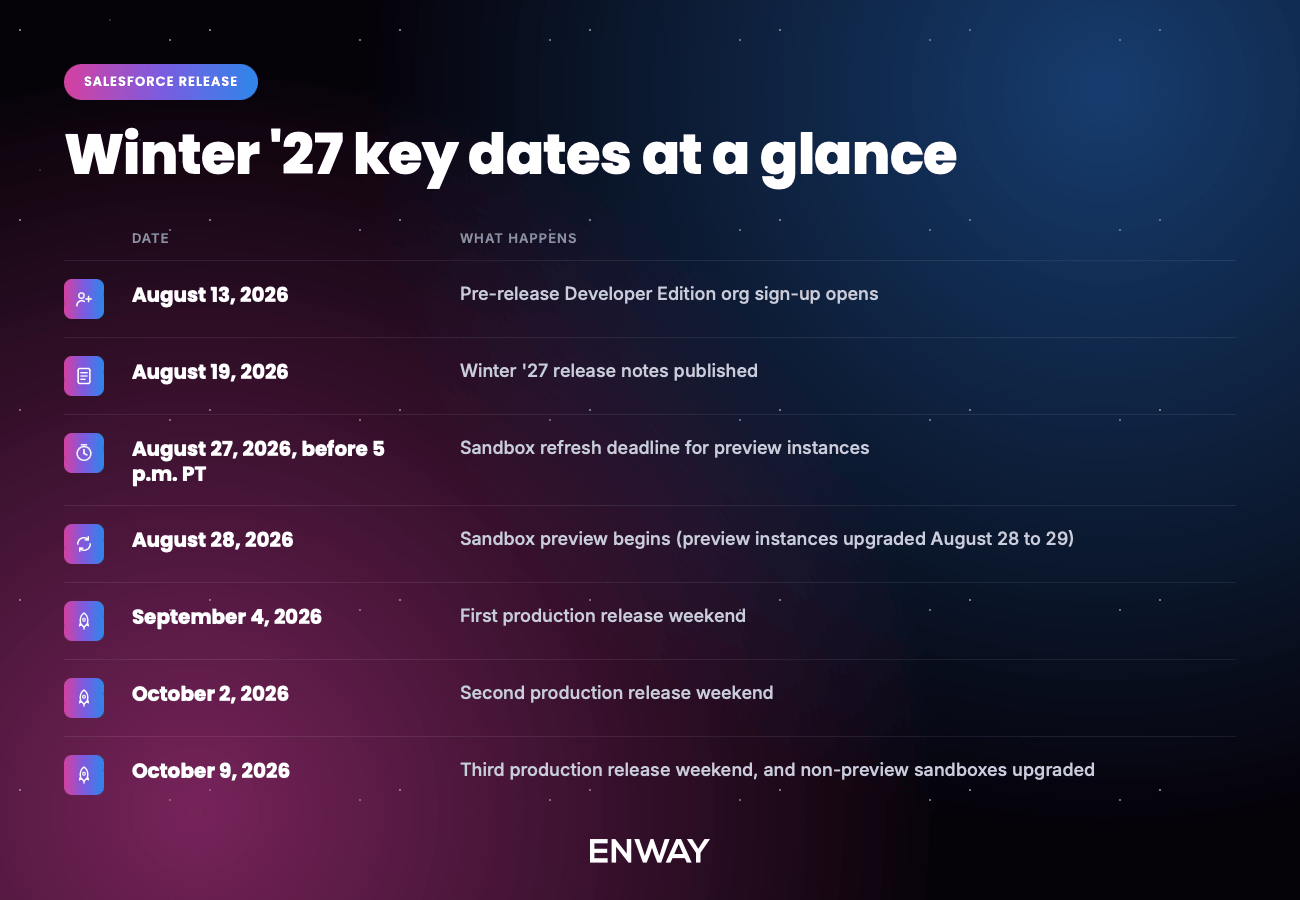
Dates confirmed by Salesforce in the official Winter ’27 admin release countdown. Production weekends are assigned by instance, so always confirm your own date on Salesforce Trust.
August 13, 2026: Sign Up for a Pre-Release Org
The first hands-on step in any release cycle is a pre-release Developer Edition org. Salesforce spins these up on the new version before sandbox preview begins, and they are free to create. If you already had a pre-release org for Summer ’26, you can log back into that one rather than creating another.
A pre-release org contains none of your data, metadata, or customisations. That makes it useless for regression testing but excellent for two other things: exploring new functionality without risk, and building internal training material and screenshots ahead of time.
The rule of thumb worth remembering: explore in a pre-release org, test in a preview sandbox.
August 19, 2026: Read the Release Notes
Update: the notes went live a day early, on August 18, 2026. You can read them now in the Winter ’27 release notes on Salesforce Help.
The release notes are the first complete account of what is changing. They cover hundreds of updates across every cloud, including new features, changed behaviour, deprecations, and the Release Updates that will be enforced automatically.
Do not try to read them end to end. Filter by the products and clouds your organisation actually uses, then sort by whether a change is enabled by default, requires admin setup, or is a Release Update. That third category is the one that causes incidents.
August 19 gives you eight days between the release notes and the sandbox refresh deadline. That is enough time to build a testing list, but only if someone is assigned to read the notes that week rather than “at some point before the release.”
August 27, 2026: The Sandbox Refresh Deadline
This is the most important date in the Winter ’27 calendar, and the one teams miss most often.
Salesforce splits sandboxes into two groups each cycle:
- Preview instances get the new release early, at the start of the preview window
- Non-preview instances stay on the current release until October
To have a sandbox on a Winter ’27 preview instance, the create or refresh request must be complete before the cutoff on August 27. Submitted is not the same as complete.
One detail worth getting right: Salesforce Help documents the technical cutoff as 6:00 p.m. PT on August 27 (01:00 UTC on August 28), while the official admin countdown tells admins to act before 5 p.m. PT. Treat 5 p.m. PT as your deadline and you have an hour of margin rather than a race against a queue.
That margin matters, because Salesforce warns that requests back up as the deadline approaches, especially for full sandboxes, which can take a long time to copy. Any sandbox that has not finished copying by the cutoff is reset to a non-preview instance. Submit at least a week early.
To check where your sandboxes currently sit, open Setup, search for Sandboxes, and look at the Release Type column. The Sandbox Preview Guide will also tell you, instance by instance, whether you need to refresh at all.
If you would rather stay on Summer ’26, you have two options: use the Request Non-Preview option when refreshing before the cutoff (this needs an org permission from Salesforce Support), or simply refresh after the cutoff has passed.
August 28, 2026: Sandbox Preview Begins
Preview instance sandboxes are upgraded to Winter ’27 over August 28 and 29.
How much testing time this buys you depends entirely on your production wave:
- First wave (September 4): roughly one week
- Second wave (October 2): roughly five weeks
- Third wave (October 9): roughly six weeks
Check your production date before you plan your testing schedule, not after. Teams in the first wave need a compressed, prioritised test plan covering critical paths only. Teams in the October waves can afford a full regression cycle.
During the preview period you should:
- Run your critical business processes end to end
- Validate integrations, especially anything using older authentication
- Check custom Apex, Lightning Web Components, and Flows
- Confirm managed packages from AppExchange vendors are Winter ’27 ready
- Review Release Updates in Setup and run Test Run where available
- Update internal documentation and training material
One constraint to plan around: metadata created or edited using Winter ’27 features or API versions cannot be deployed to production until production is itself upgraded. Keep release testing separate from your normal deployment pipeline during this window.
If you keep a sandbox on the non-preview track, it will not receive Winter ’27 until October 9 or 10, 2026.
September 4, October 2, and October 9, 2026: Winter ’27 Arrives
Winter ’27 reaches production in three waves. Release weekends run from Friday evening into Saturday, so you may see October 2 and October 3 used interchangeably for the same event.
Your exact date depends on your instance, not on your region or company size. Two companies of similar size can be upgraded five weeks apart.
The quickest way to find yours is My Trust Center, and this is the part that has changed since the last release cycle. Trust used to be a public status page you searched by instance name. It is now personalised: log in with your Salesforce credentials and you get status and maintenance events tailored to your own tenants, production and sandboxes together, with no instance lookup required.
That removes the step most people got wrong. Instance names change when Salesforce migrates an org, so anyone working from an instance noted down during a previous release could end up reading the wrong upgrade window. A logged-in view always reflects where your orgs actually sit today.
Open the Maintenances view, find the Winter ’27 major release event, and note the start and end time in your local timezone.
If you would rather not log in, or you are checking an org you do not have credentials for, the public route still works:
- In Setup, open Company Information and note your instance name, organisation ID, and My Domain URL
- Go to the Salesforce Trust maintenance calendar and search for that instance or your My Domain
- Find the Winter ’27 major release event and note the start and end time
While you are there, subscribe to Trust notifications for production and any business-critical sandboxes. Release dates occasionally shift, and a notification is more reliable than a date someone wrote down six weeks earlier.
Put that date, not the generic weekend list, in your team calendar.
Then check the upgrade window against your own business calendar: billing runs, month-end close, campaign launches, and scheduled integration batches. You cannot move the release, but you can move a batch job.
A Practical Winter ’27 Preparation Checklist
- Sign up for a pre-release org from August 13 and give it to whoever runs user training
- Assign someone to read the release notes the week of August 19, filtered to your clouds
- Run every sandbox through the Sandbox Preview Guide and decide preview or non-preview for each
- Submit refresh requests at least a week before the August 27 deadline
- Look up your production upgrade date on Salesforce Trust and share it with the business
- Build an integration inventory, starting with anything using the OAuth username-password flow
- Configure DKIM or Authorized Email Domains before enforcement, while it is a small task
- Contact AppExchange vendors to confirm Winter ’27 readiness for managed packages
- Book a regression testing window sized to your actual wave
- Prepare user communication for anything users will visibly notice
- Freeze non-essential production changes over your upgrade weekend
Preparation is what separates a release nobody notices from one that generates a Monday morning incident.
Frequently Asked Questions
Production instances are upgraded across three weekends: September 4, October 2, and October 9, 2026. Your specific date depends on your instance and is published on the Salesforce Trust maintenance calendar.
The sandbox preview window begins August 28, 2026. Preview instance sandboxes are upgraded on August 28 and 29.
Your sandbox create or refresh must be complete on August 27, 2026, before 5 p.m. PT. Salesforce Help documents the technical cutoff as 6:00 p.m. PT (01:00 UTC on August 28), but requests that finish after the cutoff are routed to a non-preview instance, so aim earlier.
August 19, 2026, in the Release Notes section of Salesforce Help.
From August 13, 2026. If you created a pre-release org for Summer ’26, you can log back into the same environment.
No. Salesforce upgrades all orgs automatically. You can choose whether a sandbox previews early, but you cannot decline or delay the production upgrade.
On October 9 and 10, 2026, alongside the final production wave.
Need Help Getting Ready for Winter ’27?
If your instance is in the September 4 wave, you have about a week of preview testing, and the integration work behind the Winter ’27 Release Updates is the kind that only surfaces when something breaks.
If your team needs an extra pair of hands for regression testing, an integration audit, or migrating off the username-password OAuth flow, get in touch. ENWAY has been delivering Salesforce implementation, integration, and managed services projects across Europe, the UK, the UAE, and the US since 2016.
